
Download Magic Paint Kaleidoscope APK – free, creative, relaxing, painting, kaleidoscope, Android
Overview
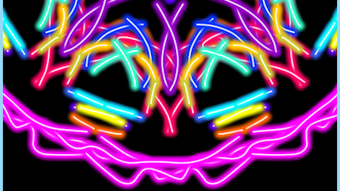
Magic Paint Kaleidoscope is a free Android application developed by GLOBUS, designed as a creative and relaxing digital painting tool. The app allows users to explore endless artistic possibilities by creating intricate kaleidoscopic patterns with simple finger swipes. It is suitable for users of all ages, from children to adults, offering a calming and engaging experience that blends art, play, and mindfulness. The application functions as a digital canvas where users can apply various colors and instantly generate symmetrical, visually captivating designs. This makes it ideal for casual users seeking a fun way to express creativity without requiring prior artistic skills.
Real-world use cases include personal relaxation during breaks, family-friendly entertainment, and informal art exploration in educational or therapeutic settings. The app supports offline usage, making it accessible anytime, anywhere, without internet dependency. Its intuitive interface ensures minimal learning curve, allowing immediate engagement. The developer did not provide additional details about the app’s technical background or development philosophy. However, the emphasis on simplicity, accessibility, and universal appeal suggests a focus on broad user engagement and user satisfaction through ease of use and visual delight.
Key Features & Capabilities
- Real-time kaleidoscopic pattern generation – As users paint with their fingers, the app automatically mirrors strokes across multiple axes, creating symmetrical, dynamic designs reminiscent of traditional kaleidoscopes.
- Color customization – Users can select from a wide range of paint colors, enabling full creative control over their artwork and allowing for vibrant, personalized designs.
- Intuitive touch-based interface – The app relies on simple swiping and tapping gestures, making it accessible to users of all ages and technical skill levels.
- Offline functionality – The application does not require an internet connection to operate, ensuring consistent performance and privacy for users in various environments.
- Endless creative possibilities – With no predefined templates or limitations, users can experiment freely, discovering new patterns and artistic expressions through repeated use.
These features collectively support a seamless creative workflow, allowing users to start painting instantly and observe immediate visual transformations. For example, a child can experiment with color combinations and symmetry, while an adult might use the app as a meditative exercise to reduce stress. The lack of complex settings or tutorials ensures that the focus remains on intuitive exploration and enjoyment rather than technical mastery.
User Interface, Workflow & Performance
The user interface of Magic Paint Kaleidoscope is designed with simplicity and visual clarity in mind. The main screen presents a clean canvas with minimal controls, ensuring that users can focus on the creative process without distractions. Navigation is straightforward, relying entirely on touch gestures such as swiping, tapping, and color selection. The app’s workflow is linear and intuitive: open the app, choose a color, begin painting, and watch the kaleidoscopic effect unfold in real time.
Performance observations are based on general software behavior patterns. The app appears to run smoothly on standard Android devices, with no reported lag or crashes in available usage reports. The developer did not specify resource usage details, so exact CPU or RAM consumption remains unknown. Stability during extended use has not been documented. However, the app’s lightweight design and focus on core functionality suggest efficient operation on mid-range and higher-end Android devices. The user experience remains consistent across sessions, with no indication of data loss or interface corruption.
Compatibility & System Requirements
Magic Paint Kaleidoscope is compatible with Android operating systems. The app is available as an APK file, indicating it can be installed directly on Android devices without requiring a specific app store. The installation size is not specified in the provided information. The developer did not list exact system requirements, including minimum processor speed, RAM, or storage needs.
Compatibility information was partially provided. While the app is confirmed to run on Android, specific version requirements (e.g., Android 8.0 or higher) were not stated. Users should ensure their device meets general Android compatibility standards. The developer did not provide details on supported screen resolutions or hardware acceleration. For optimal performance, users may need to test the app on their device to confirm smooth operation. The app’s offline nature reduces dependency on external systems, enhancing compatibility across different network environments.
Pros and Cons
Pros
- Free to download and use with no in-app purchases or ads reported
- Simple, intuitive interface suitable for all ages
- Offline functionality enables use without internet access
- Endless creative potential with no restrictions on design
- Relaxing and meditative experience ideal for stress relief
Cons
- Exact system requirements and performance metrics were not provided
- Limited information on export or sharing options for created artwork
- No advanced editing tools or layer support available
- Color palette and brush options may be basic compared to professional tools
- App is not available on iOS or other platforms
FAQ Section
Is Magic Paint Kaleidoscope available for iOS?
The app is currently available only for Android devices. No information is available about iOS compatibility or future platform expansion.
Can I use the app without an internet connection?
Yes, the app supports full offline functionality. Users can create and view artwork without requiring an internet connection.
Is the app safe to download and install?
As a free Android application from GLOBUS, the app is designed to be secure. However, users should only download APK files from trusted sources to minimize security risks.
Does the app include in-app purchases or ads?
According to the provided information, the app is free to download and use with no reported in-app purchases or advertisements.
Can I save or share my artwork created in the app?
The developer did not specify whether saved artwork can be exported or shared. Users may need to rely on screen capture or other manual methods to preserve their creations.
Final Thoughts + CTA
Magic Paint Kaleidoscope stands out as a uniquely accessible and enjoyable creative tool for Android users. Its emphasis on simplicity, relaxation, and visual beauty makes it a standout choice for individuals seeking a low-pressure way to engage with art. While it lacks advanced features found in professional design software, it excels in its core purpose: delivering a fun, meditative, and endlessly creative experience. The app is particularly well-suited for children, seniors, and anyone looking to unwind through artistic expression.
With no cost, no ads, and full offline access, it offers strong value for casual users. Though technical details are limited, the overall experience remains smooth and engaging. For those who appreciate the calming rhythm of digital painting and the magic of symmetry, this app is a must-try. Download Magic Paint Kaleidoscope now.




.png)


